Comparison
Thermal vs Empower
Empower offers genuinely free financial tools with solid portfolio tracking and a 5,000-scenario retirement planner. Thermal goes deeper: 10,000 scenarios, eight withdrawal strategies, Roth conversion planning, and no advisory upsell.
Thermal
$14.99 – $29.99/mo
Tools only. No advisory. No sales calls.
Empower
Free*
*Advisory upsell at 0.89% AUM
| Feature | Thermal | Empower |
|---|---|---|
| Transaction categorization | ||
| Custom categories | Unlimited | Max 30 |
| Transaction rules (auto-apply) | Limited | |
| Bulk transaction editing | ||
| Spending flows / Sankey | ||
| Treemap spending visualization | ||
| Receipt scanning | ||
| Budget tracking | ||
| Portfolio tracking | ||
| Multi-brokerage consolidation | ||
| Investment Checkup / allocation | ||
| Fee Analyzer | ||
| Tax-lot tracking | ||
| Monte Carlo simulation | 10K runs | 5K runs |
| Withdrawal strategies | 8 | Limited |
| Roth conversion planning | ||
| Spending-to-retirement bridge | ||
| Social Security estimation | ||
| Net worth tracking | ||
| Real estate tracking | ||
| No advisory upsell / sales calls | ||
| Household / couples support | Limited |
See The Difference
Twice the paths, eight strategies, no phone call
Empower's free planner runs 5,000 scenarios on a single default withdrawal approach, and linking real balances invites a call from its advisory team. Thermal runs 10,000 Monte Carlo paths across eight withdrawal strategies. Tools only, no upsell.
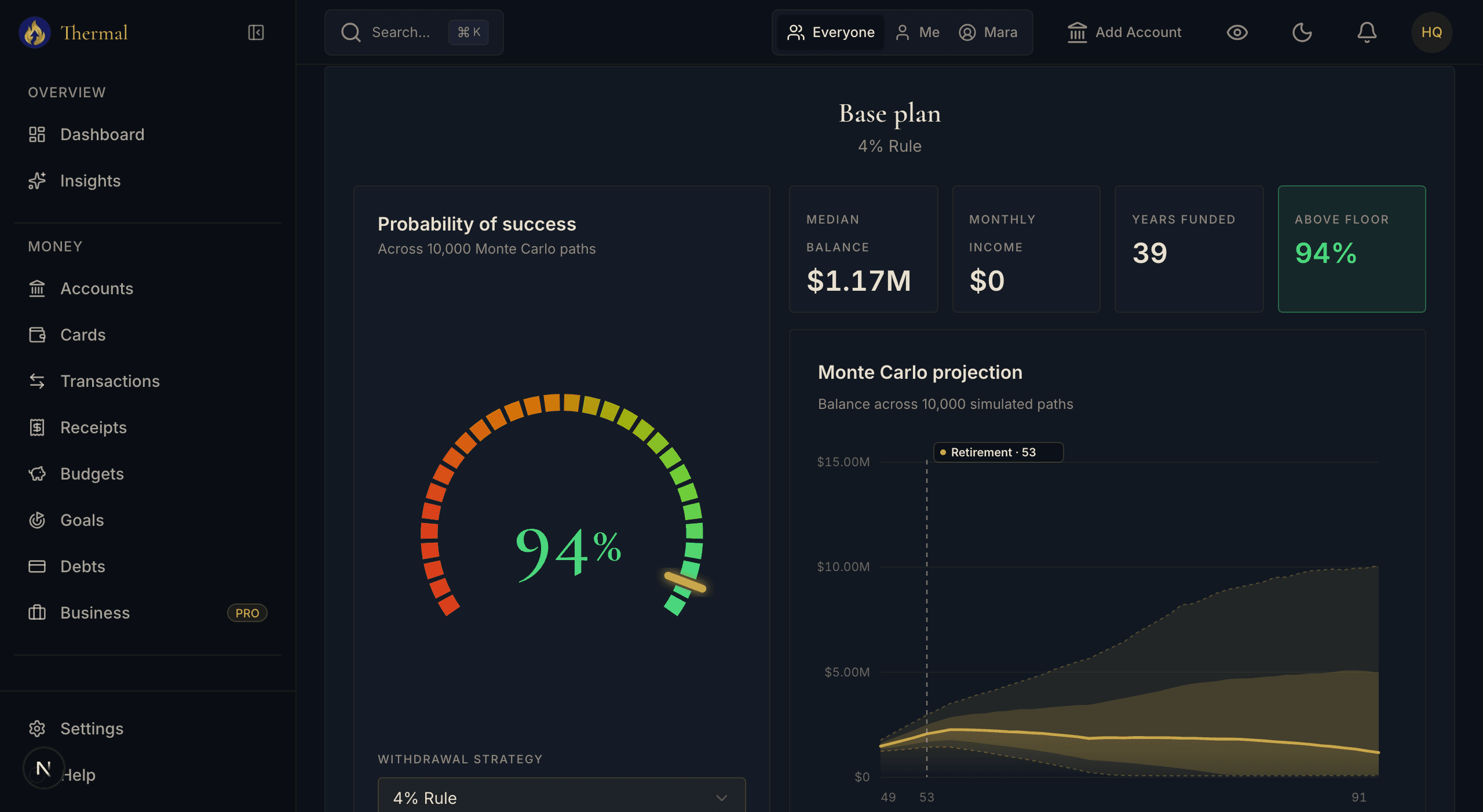
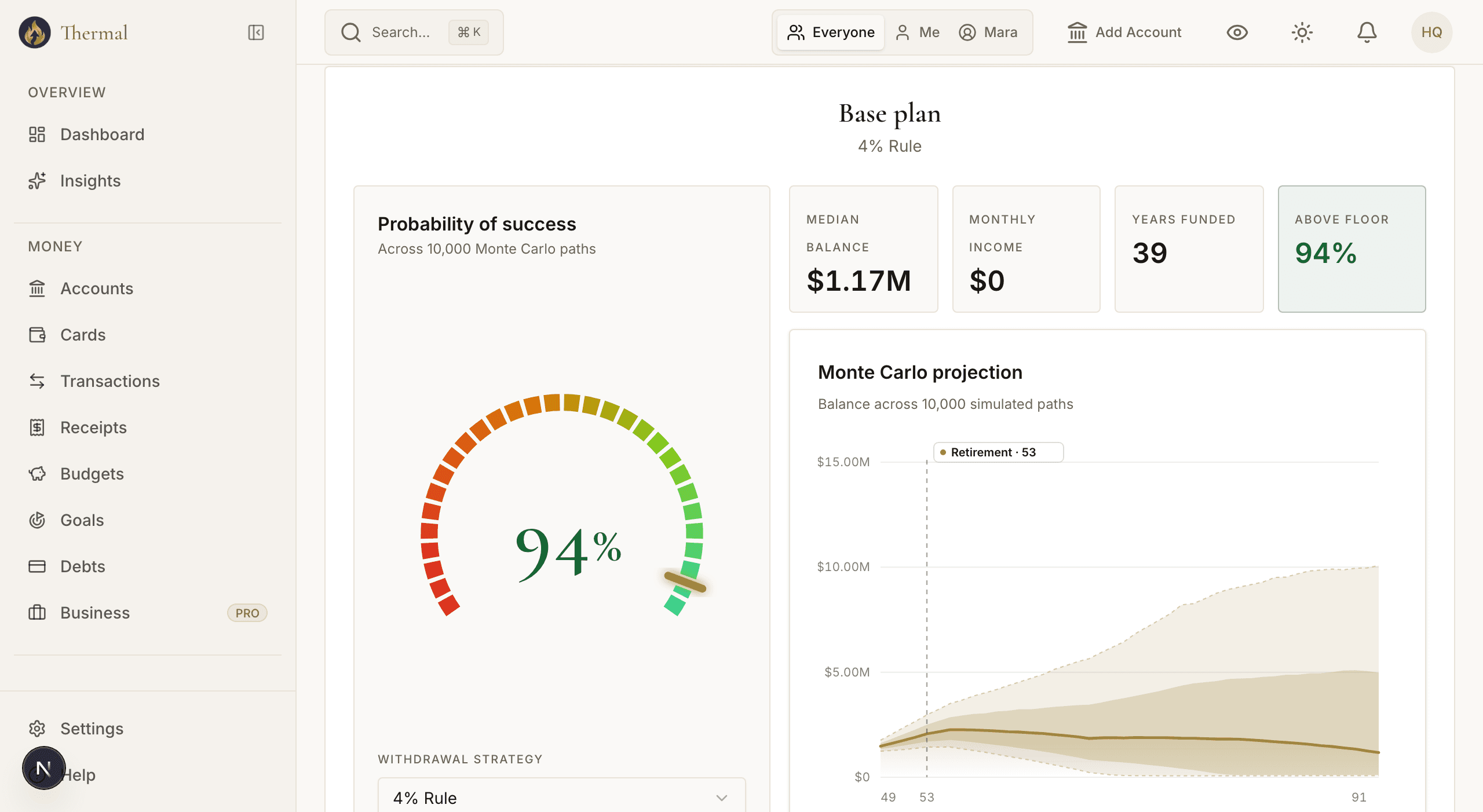
A 94% success probability across 10,000 simulated paths, retiring at 53, with the withdrawal strategy selectable below the gauge.
Why switch from Empower?
Professional-grade tools without the advisory upsell
Empower's free tools exist to funnel you into their wealth management service at 0.89% of assets under management. Link accounts with significant balances and expect calls from their advisory team. Thermal is tools-only: no advisory service, no sales team, no phone calls. You get powerful analysis tools and keep full control of your decisions.
10,000 Monte Carlo scenarios with eight withdrawal strategies
Empower's retirement planner runs 5,000 scenarios. That is solid, but it offers a single default withdrawal approach. Thermal runs 10,000 scenarios across eight distinct strategies including Guyton-Klinger guardrails, variable percentage withdrawal, floor-and-ceiling, endowment, and Buy-Borrow-Die. Each strategy models tax-aware drawdown sequencing across traditional, Roth, and taxable account buckets.
Spending visualization that goes beyond basic charts
Empower provides standard category bar charts for spending. Thermal adds Sankey flow diagrams that trace money from income sources through spending categories, plus treemap visualizations that reveal proportional spending at a glance. These make invisible spending patterns obvious in ways traditional charts do not.
The Bridge connects daily spending to your retirement date
Empower keeps budgeting and retirement in separate silos. Thermal's Bridge feature shows exactly how today's spending decisions shift your projected retirement date and success probability. Cut $200 a month from discretionary spending and see the impact on your Monte Carlo results in real time.
Financial planning without the sales pitch
Deeper analysis tools. More withdrawal strategies. No advisory upsell. No phone calls. Just better insight into your money.
Try Thermal Free for 14 Days14-day free trial · No credit card required
Frequently Asked Questions
- Is Empower (Personal Capital) really free?
- The dashboard tools are genuinely free and comprehensive: portfolio tracking, net worth, Fee Analyzer, and a 5,000-scenario retirement planner. But Empower is primarily a wealth management company. The free tools are the lead generation funnel for their advisory service at 0.89% of assets under management. If you link investment accounts with significant balances, expect calls from their advisory team.
- Why pay for Thermal when Empower is free?
- Thermal's Standard plan at $14.99 per month gives you 10,000 Monte Carlo scenarios instead of 5,000, eight withdrawal strategies instead of limited options, Roth conversion planning, Sankey and treemap spending visualization, receipt scanning, unlimited custom categories, and the Bridge feature. Most importantly, you are not the product. There is no advisory upsell, no data monetization, and no sales calls.
- What does Empower do better?
- Empower's tools are free, which is a real advantage if cost matters. Their Fee Analyzer identifies hidden fund fees across your portfolio, something Thermal doesn't have. Their 401(k) fee analysis is unique and valuable. They have an established brand and a long track record, and their retirement planner runs 5,000 solid scenarios. If you want free portfolio monitoring and don't mind the advisory calls, Empower works well.
- Can I import my Empower data into Thermal?
- Empower allows CSV export of transactions and holdings. Use Thermal's CSV import wizard to bring your transaction history over. Investment accounts reconnect via Plaid, pulling current holdings directly from your brokerages.